


Prepared for AJG Aerospace · Clarkston, MI

We built the demos.

Four working pieces of software for a shop that cuts parts bound for orbit: a live board for all six machines, a copilot that reads every RFQ before anyone opens it, a portal where customers watch their parts move, and a recruiting app that turns "we're hiring" into tours booked. Open them, tap around, break them.

4Working demos
6Machines modeled
28Features to try
1Link to send

Don't take our word for it

Try them. Every one is live.

These aren't mockups. Each demo runs in the browser with AJG's real envelopes, certifications and materials, and the four share one story: the jobs on Floor Board are the orders a customer watches in Flight Line, and Quote Desk knows when each machine opens up. Open them on your phone; that's where the floor leads and the buyers will be.

01

Shop floor console · Flagship

Floor Board

ajg.hoosai.dev/floor

Six large-format machines, two shifts, and work that runs for days per setup. Floor Board puts the whole floor on one screen: what every spindle is cutting, which op it's on, when it comes off, and where a rush job can go without moving anything else. It's built around the moment that costs the most: a customer calls with an AOG part due Tuesday and Thanksgiving closes the shop Thursday.

  1. iA floor map with each machine drawn to its real envelope, andon lights that pulse with live state, and a progress edge on every footprint.
  2. iiSix machine cards with the job, op, percent done, off-machine time and a live spindle-load trace, on a 1x, 10x or 60x shop clock.
  3. iiiSlot finder: a rush order checked against all six envelopes, the live schedule and the shop calendar, with the best and backup slot and why.
  4. ivA ten-day schedule that takes the rush with one tap, with weekends and Thanksgiving hatched out.
  5. vA job traveler for every machine: routing ops, who signed each one, ITAR and AS9102 flags, and a sign-off button on the current op.
  6. viA live floor feed of probe cycles, CMM passes, tool swaps and material received with heat numbers.
  7. viiA shift handoff brief written from the live floor, plus Ask Floor Board for risk, tool life, first articles and rush slots.
  8. viii
    Production pass: live machine data from the Heidenhain and Siemens controls, your ERP's jobs and routings, real tool-life counters, and traveler sign-offs stored for AS9100 records.
Open the live demo
ajg.hoosai.dev/floor
Floor Board showing the shop floor map, six machine cards and the live floor feed
ajg.hoosai.dev/floor/#/schedule
Floor Board slot finder recommending FZU37-01 for a rush drill jig rebuild

The six envelopes it schedules against, to scale (X by Y)

02

RFQ copilot

Quote Desk

ajg.hoosai.dev/quote

An RFQ for a large fixture is a drawing, a model and a terms document with a dozen flowdowns buried in it. Quote Desk reads the whole package the moment it lands: it pulls out what the part needs, flags the conflicts, checks it against every machine, rolls up hours, reads every clause, and drafts the reply. Your estimator still sets the number. Quote Desk never prices a job.

  1. iOne inbox for RFQs from launch, satellite, aerostructures and UAS customers, tagged ITAR, FAI and quantity.
  2. iiRead the package: a scan across the drawing pulls out part, rev, material, envelope, tolerance, finish and ship date, and flags conflicts like a temper that differs between a note and the title block.
  3. iiiAn envelope check against all six machines with rotation, picking the smallest machine that fits so the Dinamika stays free.
  4. ivToo long for any machine? It plans the split: two sections in parallel, then pinned, welded and aligned in the build bay.
  5. vA route with hours by op and a quantity stepper that re-rolls setup against run time.
  6. viFlowdowns read in plain English (ITAR, AS9102, DFARS specialty metals, counterfeit parts, liquidated damages) with accept, review or exception, plus AS9100D contract review checked off.
  7. viiA drafted reply with the clarifying questions and any exceptions, ready to send to estimating.
  8. viii
    Production pass: connected to the quotes inbox and your ERP, hours learned from your own closed jobs, your terms playbook, and drawings kept inside your ITAR controls.
Open the live demo
ajg.hoosai.dev/quote
Quote Desk showing the envelope check and hours roll-up for a LOX dome trim fixture RFQ

What happens when a package lands

DrawingScanned, title block read
Facts8 pulled, conflicts flagged
Envelope6 machines checked
HoursBy op, by quantity
TermsEvery flowdown read
ReplyDrafted for the estimator
03

Customer portal

Flight Line

ajg.hoosai.dev/portal

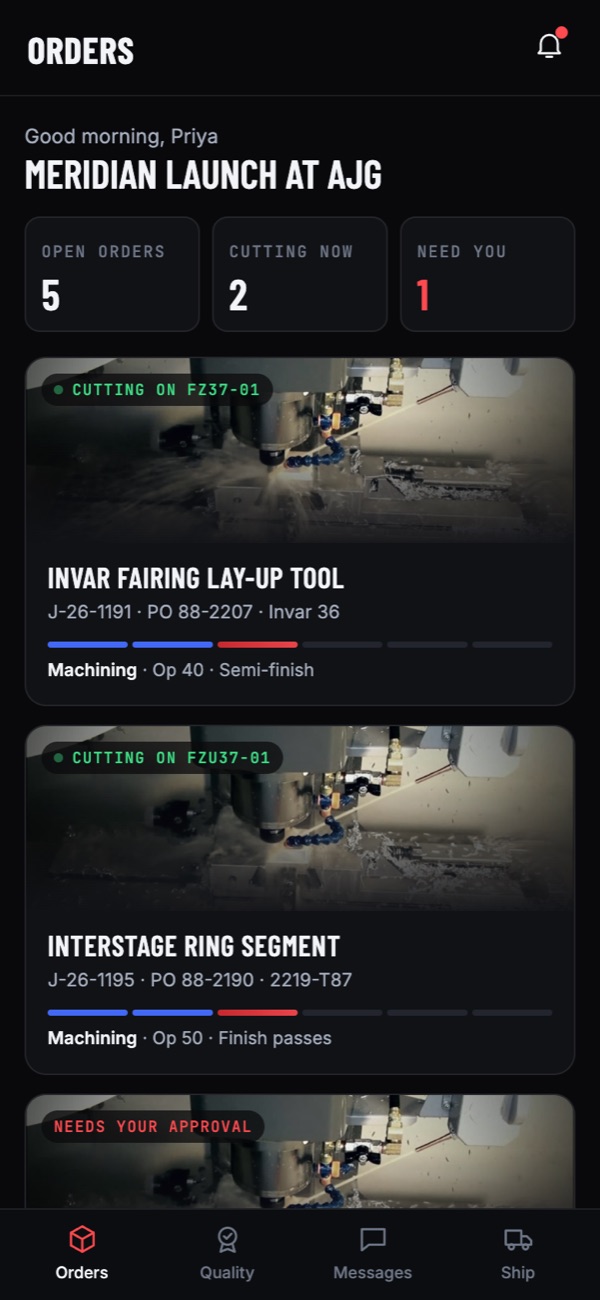
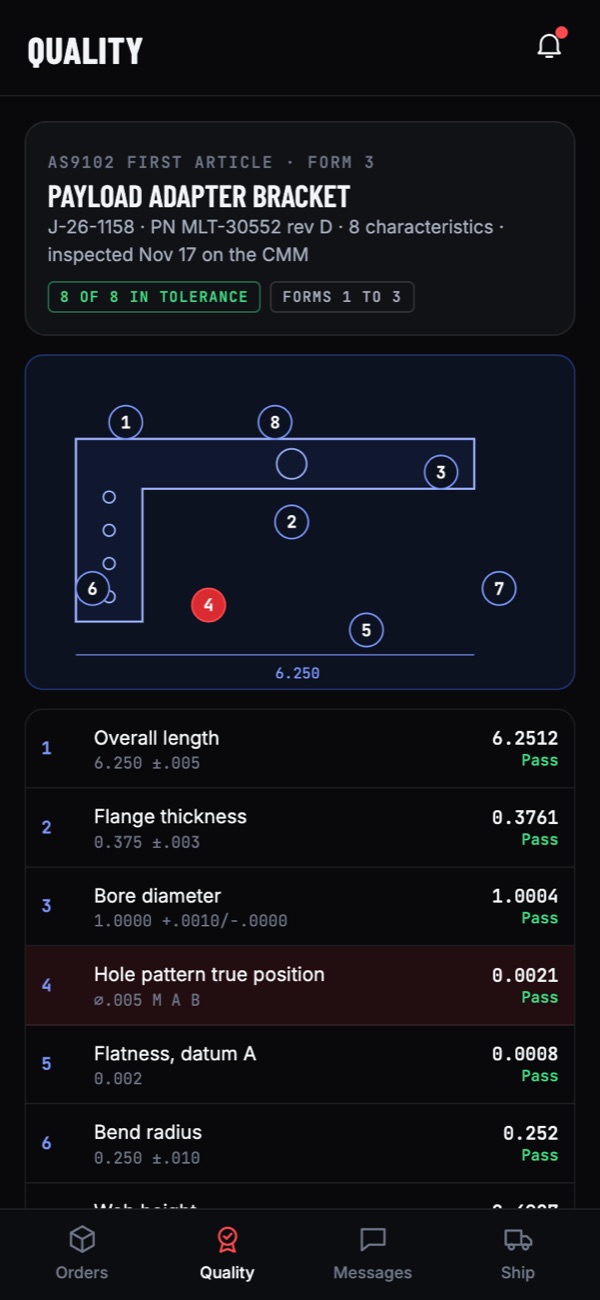
Launch and defense buyers call because they can't see their parts. Flight Line lets them see: their orders moving through the shop, the machine cutting them right now, photos from the floor, the CMM numbers, a first article to sign from their phone, and the crate on the road. Fewer status calls for your team, and a reason for customers to send the next RFQ.

  1. iA U.S.-person-verified sign-in, so ITAR data only reaches people cleared to see it.
  2. iiEvery open order on a six-stage track, from programming to ship, with "cutting now" chips on live jobs.
  3. iiiAn order page that streams percent done and spindle load from the machine, with the full stage history.
  4. ivPhotos from the floor and documents on tap: material certs to heat, the signed traveler, CMM reports, the CoC.
  5. vAn AS9102 first article with tap-to-find balloons on the drawing and a signature that releases the part to ship.
  6. viMessages with the program manager, answered from the same live data.
  7. viiLive shipment tracking with ETA and a shock log, and a one-tap path to send a new RFQ.
  8. viii
    Production pass: per-customer accounts with U.S. person verification, documents from your quality system, real carrier tracking, and installable iOS and Android builds.
Open the live demo
Flight Line orders screen with two jobs cutting live Flight Line AS9102 first article with ballooned drawing

J-26-1191, as the customer sees it today

Programming
Material
Machining · FZ37-01
Inspection
First article
Ship
04

Recruiting app

Join the Crew

ajg.hoosai.dev/crew

The shop grows as fast as it can find machinists. Crew is the link you put everywhere: a two-minute application built for a phone, a three-question print check instead of a resume screen, and a shop tour booked at shift change. On the other side, the hiring lead gets a board where every applicant already has a one-line read.

  1. iFive roles, including an apprentice track that needs no experience and says so.
  2. iiA profile in taps: years in a shop, machines run, controls and CAM, with no resume required.
  3. iiiU.S. person confirmation up front, since every AJG role touches ITAR work.
  4. ivA print check: a feature control frame, a bore tolerance, and why Invar is the tooling material, each with the answer explained.
  5. vA crew card with the score, experience and fit, in AJG's red, white and blue.
  6. viShop tours booked at shift change, then the applicant lands on the board with a written read.
  7. viiA crew board for the hiring lead: new, screening, tour booked and offer.
  8. viii
    Production pass: your real openings, text confirmations and reminders, your ATS or a simple shared board, and links for job boards, the trade schools and the website's careers page.
Open the live demo
ajg.hoosai.dev/crew
Crew applicant card next to the crew board

Roles in the demo

CNC Machinist, 5-axis2nd shift
CNC ProgrammerDays
CMM InspectorDays
Welder / Fabricator1st shift
Apprentice MachinistPaid training
Your next openingAdd any role

Partnership

We invest in the teams we want to build with.

AJG is the kind of shop we'd like to be building for over the long haul, which is why we put in the work before the first meeting. For partners like that, we invest alongside you: co-branded work, case-study rights, and reference builds that let other manufacturers see what's possible. The specifics land in the walkthrough, with no fine print.

Co-brandedAJG leads. We stay in the credits.
Case studyTold together, on your terms.
Reference buildsShown to other shops only with your yes.

Next steps

From demo to the real thing.

Step 01Walkthrough

We open all four demos with you and the floor leads, and hear which one would change the most Monday mornings.

Step 02Scope lock

We pick the first build, map it to your machines, ERP and quality system, and agree on exactly what ships.

Step 03Build to launch

We build the real thing with your team in the loop, put it on the floor, and keep tuning it once people use it.

A vision, taking flight.

Let's build the software to match the machines.